Make your own memory game: tips and ideas for designs
What do I need?
In addition to the designs for the memory game you will need:
several layers of sturdy cardboard (similar to the back of a drawing pad)
craft glue and scissors
colored pencils, wax crayons, or markers
Print out and glue design templates:
In craft books or online there are plenty of templates with memory game designs. The advantage of these templates is that the designs are usually arranged on A4 sheets. You just need to copy or print them and glue them directly onto cardboard. Your child can then color the designs and cut them into cards.
Memory game with hand-drawn designs:
With hand-drawn designs it's best to glue white paper onto the cards in advance and trim them. Your child can then draw a simple motif like a flower, a heart, a person, etc. on two cards each. Of course these pictures won't be completely identical, but that's precisely the charm of a self-designed memory game. Alternatively, you can copy a drawn motif, stick it onto a second card and color it in.
Making a memory game with children - here's how
Child-friendly crafting materials: Child-safe scissors, colored pencils or markers and craft glue are found in almost every family household. They are also best suited for making the memory game. That way there is neither frustration nor injuries.
Offer help: When carefully gluing the designs onto the cardboard or when cutting along the lines, children may need a little help. But let your child do as much as possible themselves - they'll be all the more proud later of their own memory game.
Put perfectionism aside: Who cares if the cards are cut a little crooked or the designs are colored "creatively"? The fun of crafting is much more important than appearance and the card with the crooked edge will quickly become the favorite card because it's immediately recognizable when looking for pairs.
Which memory game for which age?
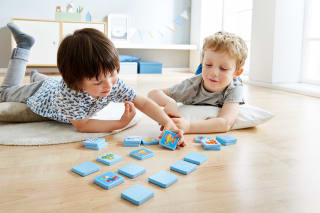
Already from around 2 1/2 years children can recognize and match identical designs. The younger a child is, the larger the motif cards should be and the fewer cards the game should have. As a rough rule of thumb, consider:
2-3 years: 10–14 pairs (20–28 cards total)
3-4 years: 14–20 pairs (28–40 cards total)
From age 5: up to about 25 pairs (50 cards total)
From age 8: up to about 40 pairs (80 cards total)
If there are several children in the family, feel free to make a larger number of memory game cards. When playing you can later set aside some pairs depending on the players' ages.
Make your own photo memory game: great gift for younger children
A photo memory game with pictures of family members and friends is practically a photo album to play with: children can handle familiar faces and learn, incidentally, to name people and family relationships. Furthermore, a photo memory game is a great keepsake. Even as an adult your child can still enjoy the old pictures of mom, dad, siblings and grandparents.
You'll need:
Several layers of sturdy cardboard (photo cardstock, craft board or similar)
Pictures of family members, friends, neighbors or pets, each twice
Glue (craft glue or photo glue)
Scissors, ruler and pencil for trimming the cards
Here's how:
First cut the design cards: To do this, draw a grid of 6 x 6 cm squares on the cardboard and cut out the squares.
Place the two prints/copies of a photo exactly on top of each other and also cut out a 6 x 6 cm square. If necessary, you can place one of the finished cardboard cards on the photo as a template and cut around it.
Now glue the trimmed images onto the cardboard. Don't use too much glue so the photo doesn't warp, and be sure to glue the edges carefully so they don't lift during play.
If desired, you can laminate the finished memory game cards to increase their lifespan.
Tip: If the photo memory game is meant to be a gift, you can decorate a ready-bought gift box in the appropriate size, for example with additional photos of all the 'game characters'.
More articles about leisure & creativity





Image credits
Father making crafts with his son at the table © Hero Images/Hero Images - stock.adobe.com